
Typography & fonts
Text is a first-class citizen in ONDA. The engine shapes and lays out glyphs with cosmic-text and draws them as real vector outlines on the GPU (Vello) backend — so text is crisp at any scale, with the same anti-aliasing as the rest of your vector art.
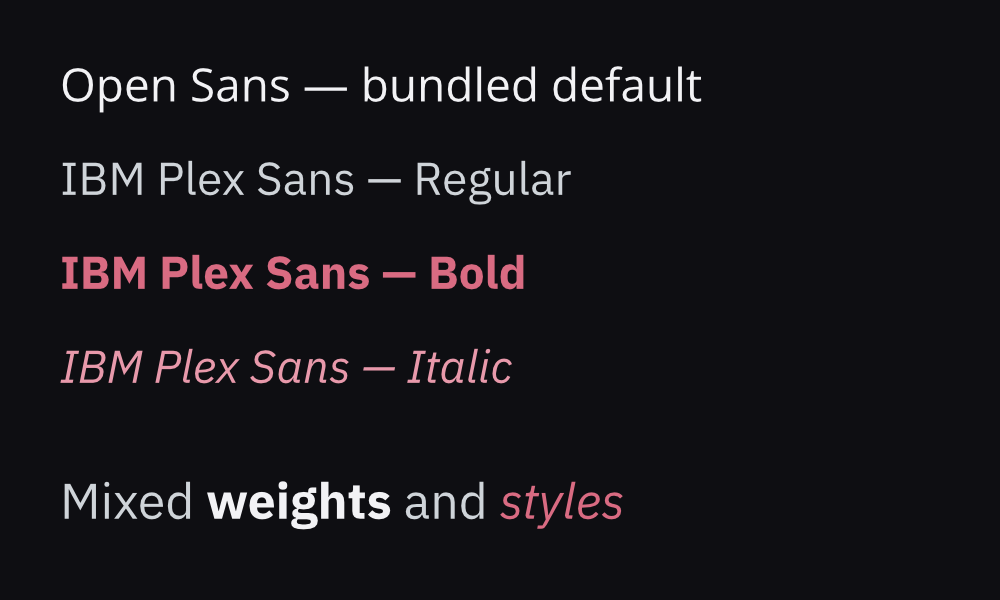
Everything above is rendered by the engine itself (onda render … --backend vello), not your browser’s fonts.
Bundled fonts
Section titled “Bundled fonts”Two families ship inside the engine binary, so text renders out of the box — no setup, no network, and deterministic: the same scene produces the same pixels on any machine, headless or not.
| Family | Faces | License |
|---|---|---|
| Open Sans | Regular | SIL OFL 1.1 |
| IBM Plex Sans | Regular · Bold · Italic | SIL OFL 1.1 |
Open Sans is the default for unstyled text. Because it ships Regular only, use IBM Plex Sans when you want a visible bold or italic from the bundled set.
Styling text
Section titled “Styling text”A <Text> takes fontFamily, fontWeight (CSS scale, 700 = bold) and italic:
<Text fontSize={64} fontFamily="IBM Plex Sans" fontWeight={700}>  Bold headline</Text>
<Text fontSize={40} fontFamily="IBM Plex Sans" italic>  An emphasised line</Text>
These map onto the scene-graph text node (font_family, weight, italic); any producer of scene JSON — React, an AI system, a hand-authored file — gets the same result.
Rich, multi-style runs
Section titled “Rich, multi-style runs”One <Text> can mix families, weights, styles, sizes and colors inline via runs. Each run overrides the node’s style; the engine lays out the line and draws every run with the correct face (the “Mixed weights and styles” line in the specimen above is a single <Text>):
<Text fontSize={50} runs={[ { text: 'Mixed ', fontFamily: 'IBM Plex Sans' }, { text: 'weights ', fontFamily: 'IBM Plex Sans', fontWeight: 700, color: '#ffffff' }, { text: 'and ', fontFamily: 'IBM Plex Sans' }, { text: 'styles', fontFamily: 'IBM Plex Sans', italic: true, color: '#d96b82' }, ]}/>Loading your own fonts
Section titled “Loading your own fonts”Bring any .ttf/.otf — a brand face, a variable font, anything free or licensed — with the CLI’s --font flag (ONDA’s equivalent of Remotion’s loadFont). Pass it once, then select it by family name on a run. Repeat the flag for several files (e.g. a Regular + a Bold):
onda render scene.json out.png \ --font fonts/Inter-Regular.ttf \ --font fonts/Inter-Bold.ttf<Text fontFamily="Inter" fontWeight={700}>Now in your brand font</Text>--font works with both backends and stacks on top of the bundled families, so loaded fonts always have a default to fall back to.
Determinism
Section titled “Determinism”The bundled fonts mean a render does not depend on what’s installed on the host — crucial for CI, servers and reproducible output. If you do want the machine’s installed fonts (convenient, but host-dependent), pass --system-fonts to the CLI.